
A Catalog
For my Final Major Project outcome, I will be designing and making a catalog. As I chose Conspiracy Theories as my main topic for the FMP, I will be choosing five most famous and the most interesting conspiracy theories that have been believed and spoken about by people for years. I will then design and make five different art pieces for every conspiracy theory I have chosen to explore. I will use all the designed artwork to make the catalog for my outcome. I will also be making and designing a cover for my catalog as my catalog will be digital and physical/print. For my digital catalog I will design the art pieces and create a PDF via any programs where each page becomes attached in a document that the viewer can scroll through. I will use Photoshop to create all the pages separately and then within Photoshop I can easily save all the pages together as a PDF catalog. I could possibly make the digital catalog in a different way however I am not sure yet. For my physical catalog I will start by printing the art pieces however I need to make sure the paper I use is heavy enough, so images do not bleed through. (I will talk about how I am going to make a physical/print catalog later as I am not sure yet).

I will start the production of the outcome for my Final Major Project by experimenting with a couple of drafts for the cover of the catalog.
Experimenting - Cover
Before I started designing the first prototype of the actual cover, I had to think about the colours, the typography and the designs I will include on my cover. I wanted to keep my cover really simple but still stand out therefore I decided to use black and white colour scheme. For the background I used black as black is associated with death, evil, and mystery. The colour is also associated with fear and the unknown. In contrast for the typography and the design I used white. I also added white borders on the sides.
For the main design of the cover I decided to use the All-seeing Eye or the Eye of Providence. The symbol usually shows an eye, often surrounded by rays of light, enclosed by a triangle. Artists used it to represent the all-seeing eye of God. However it is always used to represent the unexplained or different conspiracy theories. Some people believe that the eye means the government is always watching us.
In the first draft of my cover, for the typography I just chose to use the words "Conspiracy Theories" however I will change it after I decide what sentence or words would suit the theme of conspiracy theories.
To experiment with the cover I moved the main design/ the All-seeing Eye to the middle of the screen behind the typography however the text and the design looked too trippy and psychedelic

.png)
I moved the main design/ the All-seeing Eye a bit higher from the the middle of the screen behind the typography and I kind of liked this look as it looks mysterious and interesting however the text and the design still looked a bit too psychedelic were merging together.
.png)
I moved the main design/ the All-seeing Eye above the typography and I think this look of the cover looks the best as the text and the design is clear and the text is easily readable. I also like how the i in "Conspiracy" merges with the design. I also like how the part of the i that is covered by the design is black as I used the colour invert adjustment on the design layer.
.png)
.png)
I also decided to experiment by removing the white borders on the sides of the background and keep the whole of the background black. I believe this design of the cover looks the best as it looks the most professional and the most eye-appealing. Also the full black cover looks the cleanest.
.png)
I wanted to experiment with the design of the cover a bit more therefore I changed the canvas from portrait to landscape to see how a landscape design would work. I believe landscape looks better and more interesting therefore I will keep this design in landscape.
.png)
I was not completely done with designing my cover however I was happy with the design at the time therefore I started thinking about the typography. I opened up the notepad and started listing down names/titles for the cover that in my opinion would work well in the theme of conspiracy theories. I then started experimenting with some of the different typography by using it on the cover to see how well it would look aesthetically. The first typography I started experimenting with was "The Truth". I liked the look of this design however I believe the title "The Truth" is too simple for my theme. I also liked how the "T" in the 'Truth" has invert colour at the top as it was blending in with the design above it.
.png)
.png)
The next typography/title I experimented with was "Coincidence?". I liked the look of this design too as I believe it looks professional and has a message. As my topic is conspiracy theories, I used quotation marks in the word coincidence with a question mark to show that people question every event or situation and believe that it is the result of a secret plan or an agenda made by covert organisations. It also shows that when a negative event happens people never believe in coincidences, they believe everything is connected.
.png)
The last typography/title I experimented with was "Obscure Beliefs". I also liked the look of this design too as I believe it looks professional and aesthetically pleasing. I used this typography as "Obscure" means "not clearly expressed or easily understood or uncertain" which in this translates to "not clear, difficult to understand and unfamiliar beliefs. I believe this works well as sometimes people believe the most demented stories or theories which are hard to understand. I chose this as my final choice for the typography as I believe it works and looks the best out of all the other typography choices.
.png)
After I was done with my first finished prototype, I was happy with the look of the typography and the font used. For the typography on the cover I have used the font "Avenir LT Std". I believe this font looks both aesthetic and professional therefore I have chosen to use it. I also wanted to experiment with different versions of the font therefore I downloaded the "light", "medium" and "black" versions along side the original font. I experimented with all of the versions. You can see all three versions below. I believe both "Light" and "Medium" versions of the font were too thin therefore I chose the "Black" version. I also chose the "Black" version as I believed it was more bulky and looked mysterious which suits my topic perfectly. I believe the version of the font I chose also looks better in white and stands out more than the other versions
.png)
35 Light -
.png)
65 Medium -
.png)
95 Black -
.png)
I was happy with the look of the typography and the font used however I wanted to experiment more with the main logo and the design of the cover. The main design above the typography was "The All-seeing Eye". I liked the symbol however I wanted to experiment with placement of the symbol on the cover. I wanted the cover and the design to stand out more and be more eye-appealing therefore I enlarged the symbol of "The All-seeing Eye" and placed it underneath the typography as part of the background. I turned down the opacity of the layer to 5% to make sure the symbol is similar colour to the background however it can still stand out. I did this to make it more aesthetic.
.png)
.png)
I added a second identical symbol by duplicating the layer with the invert adjustment. I wanted to make the design more complex and eye-appealing as I believed the design before was good however too plain and simple. I placed the second layer over the first creating an interesting 3D effect. The colour of the second symbol changed as the invert adjustment layer inverts the colour of a layer based on what background or colour the layer is placed or positioned on, therefore the second layer on top is a different colour to the first identical layer. This creates a nice effect between the inverted colours and the design looks more complex which suits the theme of conspiracy theories which are always complex and hard to understand. I also like how all of the colours used in my cover are different accents of black and white.
.png)
.png)
I also decided to experiment with different typography as I changed the main design. I wanted to see if any previous typography I experimented with would suit or look good with the new design of the cover for my catalog. I tried out the titles/typography "The Truth" and "Coincidence?" I like the aesthetic of both new designs however I believe that my main title or typography "Obscure Beliefs"which I decided to use previously is more professional and intriguing. I also believe the typography "Obscure Beliefs" works better as a title for the catalog.
.png)
.png)
Experimenting - First Artwork
9/11
As my choice for the FMP outcome is a catalog of art pieces surrounding the most famous, interesting and demented conspiracy theories, I had to choose 4 of the most interesting ones I wanted to explore and display in my catalog. For the first art piece, I chose to explore the conspiracy theories of the events of 9/11. The September 11 attacks were a series of four coordinated terrorist attacks by the Islamic terrorist group al-Qaeda against the United States on the morning of Tuesday, September 11, 2001. The attacks killed 2,996 people, injured over 6,000 others, and caused at least $10 billion in infrastructure and property damage. Additional people died of 9/11-related cancer and respiratory diseases in the months and years following the attacks. There are many conspiracy theories that attribute the planning and execution of the September 11 attacks against the United States to parties other than, or in addition to, al-Qaeda including that there was advance knowledge of the attacks among high-level government officials. Government investigations and independent reviews have rejected these theories. Proponents of these theories assert that there are inconsistencies in the commonly accepted version, or evidence that was either ignored or overlooked. Also the most well-known conspiracy theory relates to the collapse of World Trade Center Tower 7.
It fell later after the collapse of the neighbouring Twin Towers.
The conspiracy theory suggests the collapse of the buildings was not solely caused by the plane attacks but also by explosives already installed in the towers. The official report into the tragedy cites flaming debris from the burning skyscraper crashing into the 47-floor Tower 7, sparking fires on several floors. The heat generated brought the tower down, concluded the National Institute of Standards and Technology making it the first steel skyscraper in the world to collapse because of fire. I find this conspiracy theory intriguing and immersively interesting as this conspiracy theory is very plausible. However people can only speculate on what happened exactly as no conspiracy theory linked to the 9/11 has ever been proven true.

To start off my first design of the 9/11 conspiracy theory, I had to choose an image to start with. I have chosen to use the image below as it completely shows the terror and dread the people experienced on the morning of 11th September. I also believe that the smoke coming from the collapsing building connotes the horror of the attack.

I wanted to put my own spin on this image/photo therefore I started to experiment with the design and different filters for the main focus of my artwork. I went into the filter tab and chose the option of Filter Gallery to experiment with different looks. After experimenting with different looks and filter I chose to use the Dry brush tool/filter as it made my main focus/image look like it was painted and that was the look I was going for, for the art pieces in my catalog.


As I wanted my designs to look as if they were painted I also found and decided to use an old oil painting overlay over the design image. I believe it turned out well as the art piece actually looked like it was drawn or painted. I also turned down the opacity to 60% to make sure the design below is visible but the effect of the oil painting overplay is still there.
Below you can see the effect of the old oil painting overlay on top of the designed 9/11 image


After designing the main image/design of the artwork, I also wanted to create an overlay that displays particular words that all link to any conspiracy theory given to show that all conspiracy theories are made of people believing the government is betraying them. These words include: issues, threat, fraud, fear, panic, police, impact and dark. Therefore I made an overlay I will be including in every artwork to show the idea mentioned above. The overlay included the words above that display how people believe governments are betraying them. You can see some of the words included on the design below


The overlay was made while using the black and white adjustment layer therefore I removed it and added some colour to the designed overlay. I used colours such as: black, red, yellow, brown and orange however all colours used had accents of other colours mixed in to add the effect of newly drained and mixed paints. I also turned down the opacity to 95%. I also used the Dry brush tool/filter in the Filter Gallery tab as it made the overlay I designed look like it was painted on


The colours used:

After I was done with making the overlay design, I combined all the designed work. I placed the main designed art piece which was the collapsing Twin Tower during the events of 9/11 underneath the overlay I just designed.(1) I then added the old oil painting overlay on top.(2) I believe this finished design works perfectly as the art piece looks painted which also makes it look aesthetically pleasing and professional.
(1)

(2)

I started experimenting with the colours, filters and the design of the overlay used over the main designed image.
I started experimenting by applying a black and white adjustment layer to the main designed image and the designed overlay however I did not add it to the oil painting overlay creating this black and white effect which has accents of green from the oil painting being greenish making the artwork interesting but dull therefore I chose not to use it

For the second design I experimented with I changed the filter of the oil painting overlay. I previously used the "Luminosity" filter/setting therefore I changed it to the "Normal" setting which changed the colours of the main designed image and the overlay. this led to the artwork being less vibrant and a bit more dull therefore I chose not to use this design


For the third design I experimented with I changed the filter of my own designed overlay. I previously used the "Normal" filter/setting therefore I changed it to the "Luminosity" setting which changed the colours of the designed overlay only which created the effect of translucency. The colours present also depended on the background behind the overlay, for example the smoke behind the overlay creates the black colour on the left side of the overlay and the blue sky behind the right side of the overlay creates the translucent blue.
For the third design I experimented with I removed the oil painting overlay but left all the effects and filters present on my main designed image and the overlay. I also turned down the opacity to 40% so the overlay has a translucent effect but kept the filter or setting of the layer "Normal" so it still has enough colour and vibrancy to see over the main designed image.
.png)
For the fourth design I went back to the first design I made and kept all the layers and the filters the same. I also kept the the overlay the same however I wanted to experiment with the placement of the main image of the 9/11 Twin Towers in the art piece. I therefore moved the collapsing buildings to the middle of the screen to show the people the main focus of the art piece. However I believe I do not need to move the image at all as the previous version looks aesthetically better and the audience will understand the main focus of the image as soon as they see it anyway as 9/11 is a world known event.
.png)
.png)
For this design I wanted to experiment with a design I previously experimented with above. I removed the oil painting overlay but left all the effects and filters present on my main designed image and the overlay too. I changed it by turning up the opacity to 95% but used the "Screen" filter/setting so the overlay has a translucent effect but is still kept vibrant to see the text and typography over the main designed image.
.png)
For this design I wanted to experiment with the main image or design of the art piece. I therefore completely removed the typography overlay and its' layer. I kept the main design of the Twin Towers design under the "Normal" setting and 100% opacity. I then changed the oil painting overlay layer from the "Normal" setting to the "Luminosity" setting and reduced the opacity to 60% which meant you could easily see the design of the Twin Towers collapsing however it would still look like it was painted as the opacity of the paint overlay is high enough to see spots of dried paint on the artwork.
.png)
.png)
For this design I followed the same pattern as the design I just talked about above however I made some changes to experiment with different colours. I kept the main design of the Twin Towers design under the "Normal" setting and 100% opacity however I changed the oil painting overlay from the "Luminosity" setting to the "normal" setting. I still kept the painting overlay 60% opacity.
.png)
For the last design I experimented with I wanted to change the whole look and aesthetic of the artwork I first created. For this design I first changed the filter of the main designed art piece of the Twin Towers collapsing to get a different look. I used the filter gallery to switch from the "Dry Brush" filter to the "Cutout" filter which changed the look of the Twin Towers completely also making the smoke even darker which could display darkness and evil. I like the look of the design however there were spaces between the smoke coming out of the building which I disliked. I changed the typography overlay filter to "Cutout" too which also changed the look of the typography. The colours were darker and more dull which suits the theme of conspiracy theories too. I also liked how some letters were missing which could make the audience guess what the word is which would make it immersive.


.png)


This is the final design of the artwork for the first conspiracy theory of 9/11. I chose to use this design as my final in particular as I believe it looks the most eye appealing, aesthetically pleasing and professional. I was going for the look of an old hand painted artwork where you can see the dry paint marks and also the mixing of the colours because of the paints splashing and going one over another. I also like the way the colours turned out as most colours used have accents of different colours inside of them because of the paint effect. In my opinion the design of the collapsing Twin Towers work well too as the dark colours on the building and the thick smoke coming out of it connote and display the dread and horror of this terrible event. The dark colours also display the darkness of this event. Only 291 dead bodies were recovered “intact” when 2,996 people died during the event. The typography overlay also works well in my opinion as it has dark colours in it however it also has some lighter colours such as blue, orange, white and yellow. These lighter colours and words represent people speculating what really happened, that is where conspiracy theories come in. All words used surround or link to a part of any conspiracy. For example the word "Fraud" displays that people always speculate they are being lied to by the government or other big organisation with a lot of power when a big negative event occurs. I also used a question mark at the end of "Fraud" to show that people don't actually know what actually happened and do not have any real evidence but they still question every noticeable event. Some parts or letters of the words used in the typography overlay are missing or cut off. I did this to make the audience guess what the word is which would make it immersive. This also suits the theme of conspiracy theories as people can only speculate what really happened in the event just like they can speculate what the missing letter words are.

Experimenting - Second Artwork
Faked Moon Landing
As my choice for the FMP outcome is a catalog of art pieces surrounding the most famous, interesting and demented conspiracy theories, I had to choose 4 of the most interesting ones I wanted to explore and display in my catalog. For the second art piece, I chose to explore the conspiracy theories of the events of the moon landing. Apollo 11 was the spaceflight that landed the first two people on the Moon. Commander Neil Armstrong and lunar module pilot Buzz Aldrin, both American landed the Apollo Lunar Module Eagle on July 20, 1969. Armstrong and Aldrin became the first people to step onto the lunar surface. They spent about two and a quarter hours together outside the spacecraft, and collected 47.5 pounds of lunar material to bring back to Earth. Apollo 11 was launched by a Saturn V rocket from Kennedy Space Center on Merritt Island, Florida, on July 16 and was the fifth crewed mission of NASA's Apollo program. Many Moon-landing conspiracy theories have been put forward, claiming either that the landings did not happen and that NASA employees have lied, or that the landings did happen but not in the way that has been told. Believers have focused on perceived gaps or inconsistencies in the historical record of the missions. The foremost idea is that the whole manned landing program was a hoax from start to end. Some claim that the technology to send men to the Moon was lacking or that the Van Allen radiation belts, solar flares, solar wind, coronal mass ejections and cosmic rays made such a trip impossible. People think the Apollo Moon landings of the late 1960s and early 1970s were staged and faked propaganda films produced by NASA in pursuit of embarrassing the USSR in the Cold War. Some people also believe that the earlier landings were faked, but that NASA finally managed to get there some time in the 1970s. They assert that the program was behind schedule and the United States faked reports of the first landing to fulfil Kennedy's unofficial deadline of "before the decade is out" and/or to score the first landing before the Soviets managed to get theirs.

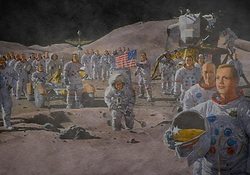
To start off my first design of the Faked moon landing conspiracy theory, I had to choose an image to start with. I have chosen to use the image below as it displays a huge number of people on the moon which was impossible at the time presenting the idea of the moon landing being faked and filmed on Earth. The astronauts also have their helmets off which would mean they are exposed to vacuum, and the air in their lungs would be forced out through their mouth. This is implausible as some of the astronauts are also smiling. These points display that this picture connotes the moon landing was filmed on Earth.

I wanted all my artwork to follow the same pattern or routine to connote the same idea or message. Therefore I started off by doing exactly what I did to the first conspiracy theory art piece. I put my own spin on this image/photo and started to experiment with the design and different filters for the main focus of my artwork. I went into the filter tab and chose the option of Filter Gallery to experiment with different looks. After experimenting with different looks and filter I chose to use the Dry brush tool/filter as it made my main focus/image look like it was painted and that was the look I was going for, for the art pieces in my catalog. I wanted all my artwork to have the same old painting style therefore I chose to use the "Dry Brush" filter for this design too.

.png)
As I wanted my designs to look as if they were painted I also decided to use the old oil painting overlay over this design. This also turned out well as the art piece actually looked like it was drawn or painted just like the first artwork. I also turned down the opacity to 60% again to make sure the design below is visible but the effect of the oil painting overplay is still there.
Below you can see the effect of the old oil painting overlay on top of the faked moon landing design


.png)
After designing the main image/design of the artwork, I decided to use the already created typography overlay which displays how people always speculate they are being lied to by the government or other big organisation with a lot of power when a big negative event occurs even if it might seem impossible by the use of words included in the overlay such as issues, threat, fraud, fear, panic, police, impact and dark.

I combined the all of the pieces by placing the main designed art piece which was a big number of people on the moon without their helmets on showing the moon landing was faked underneath the designed typography overlay.(1) I then added the old oil painting overlay on top creating the old painting effect.(2) I believe this finished design works perfectly as the art piece looks painted which makes it look aesthetically pleasing and professional just like the first artwork.
(1)
.png)
(2)
.png)
After I was done with the design, I started experimenting with the colours, filters and the design of the overlay used over the main designed image.
I started experimenting by changing the filter and the setting of the oil painting overlay to the "Normal" filter as previously I was using the "Luminosity" filter/setting. I also left the opacity of oil painting overlay layer the same which was previously 60%. This new filter/setting did not change the colours dramatically however it made the colours darker and more dull which suits the theme of conspiracy theories.


.png)
For the second design I experimented with I added a black and white colour adjustment layer to the main designed image and the designed overlay however I did not add it to the oil painting overlay. I did this by turning off the oil painting overlay when I clicked the eye icon first and added the adjustment layer to the other two layers. I then merged visible and turned on the oil painting overlay creating this black and white effect which has accents of green from the oil painting being a translucent overlay.
.png)
.png)
.png)
For the third design I experimented with I started off similar to the second design I experimented with as I added the black and white colour adjustment layer to the main image and the typography overlay but not the oil painting layer. I also then merged visible and turned on the oil painting overlay however to experiment I changed the oil painting overlay layer filter from "Normal" to "Overlay".
.png)
.png)
.png)
.png)
For the next design I wanted to experiment with the first design I came up with. As my filter/setting for the oil painting overlay was "Luminosity", I changed it to the 'Color Burn" setting which made the art piece very dark. I believe this design is not the best aesthetically and would not work as it is too dark and dull
.png)
.png)
For the fifth design I experimented with I carried one playing around and experimenting with the previous design above as I didn't like how dark it was therefore I wanted to improve it. As in the previous design I left the main edited image of the moon landing and the designed typography overlay the same and did not change anything I left this design the same however I did experiment with the oil painting overlay. I experimented with the settings and the filters of the mentioned layer. The setting and the filter previously was "Color Burn". I changed it to the "Vivid Light" filter which made the art piece lighter in colour and also more vibrant
.png)
.png)
.png)
For the last 2 designs I experimented with I wanted to change the look and feel of these designs completely. For this design I decide to first change the filter of the main designed art piece of the faked moon landing to get a different look. I used the filter gallery to switch from the "Dry Brush" filter to the "Cutout" filter which changed the look of the artwork completely. I also changed the filter of the typography overlay to "Cutout" too giving it a whole new aesthetic. I like the purple accent colour that is present in the typography overlay due to the new "Cutout" filter.
For the last design I experimented with I also changed the look and the aesthetic present in the previous experimentations completely. For this design I changed the main designed and edited image and the typography overlay layers however I kept the oil painting overlay the same. I used the filter gallery to switch from the "Dry Brush" filter to the "Plastic Wrap" which created a really cool design. I also changed the typography layer from "Normal" to "Luminosity" giving the overlay a translucent effect where you can see the astronauts through the overlay. I then merged all of the layers visible creating only one layer.

.png)


.png)
This is the final design of the artwork for the second conspiracy theory which is the faked moon landing. I chose to use this design as my final as in my opinion it is aesthetically pleasing, has a great look and a feel to it and also suits the theme of conspiracy theories pretty well. I was also going for the look of an old painting which turned out perfect as the art piece looks like it was actually painted. You can also see the dried up marks of paint and smudged edges which makes it look more professional and realistic. I believe the main edited image is perfect in this artwork as it subtly shows and displays that the moon landing was faked and filmed on Earth. First, there is a high number of people present in the image however it was impossible for this amount of people to travel at the same time as the Apollo 11 could have only carried three people. The image also shows astronauts without their helmets on. This would also be impossible as they would be exposed to vacuum instantly, and totally deprived of oxygen, the air in their lungs would be forced out through their mouth which means they would suffocate by hypoxia and die in an instant. There is another subtle evidence interpreting the moon landing was faked. If you look closely at the astronaut's on the left helmet, you could timidly see a camera's flash displaying it was filmed and photographed on Earth and not the moon. I like how this turned out as people viewing the art pieces or my physical catalog could spot the subtle references to the hoax which makes the artwork also more immersive and interesting. I will also be using my designed typography overlay on every art piece to show that all conspiracy theories no matter the context or background have the same premise.

Experimenting - Third and Fourth Artworks
Secret UFO and alien cover ups
As my choice for the FMP outcome is a catalog of art pieces surrounding the most famous, interesting and demented conspiracy theories, I had to choose 4 of the most interesting ones I wanted to explore and display in my catalog. For the third art piece, I chose to explore the idea that the government is hiding the existence of the extraterrestrials and covering up UFO crashes and other proof and evidence of aliens and other life on other planets. Such conspiracy theories commonly argue that Earth governments, especially the Government of the United States, are in communication or cooperation with extraterrestrials despite public claims to the contrary, and further that some of these theories claim that the governments are explicitly allowing alien abductions of human beings. There are a number of theories suggesting that aliens are present here on Earth. One of the theories are that the remains of crashed UFO spacecrafts are stored at Area 51, an Air Force base about 150 miles from Las Vegas, where government scientists reverse-engineer the aliens' highly advanced technology. This theory comes from a variety of supposed UFO sightings in the area and testimony from a retired Army colonel who says he was given access to extraterrestrial materials gathered from an alien spacecraft that crashed in Roswell New Mexico. Some believe that the government studies time travel at Area 51, also known as Groom Lake or Dreamland. Also speaking of the Roswell incident, There has been a number of incidents and events seen by the public. Many conspiracy theorists consider the so-called “Roswell incident” to be one of the most conspicuous and credible of evidence that the US government has covered up the existence of extraterrestrial life on Earth.

Flat Earth
For the last art piece, I chose to explore the idea that the Earth is actually flat and not a globe(round). Members of the Flat Earth Society claim to believe the Earth is flat. Walking around on the planet's surface looks and feels flat therefore the believers they deem all evidence to the contrary. They believe that satellite photos of Earth as a sphere, are fabrications of a "round Earth conspiracy" orchestrated by NASA and other government agencies. The belief that the Earth is flat has been described as the ultimate conspiracy theory. They say that Earth's gravity is an illusion. Objects do not accelerate downward; instead, the disc of Earth accelerates upward at 32 feet per second squared, driven up by a mysterious force called dark energy. Currently, there is disagreement among flat-earthers about whether or not Einstein's theory of relativity permits Earth to accelerate upward indefinitely without the planet eventually surpassing the speed of light. Flat-earthers also believe photos of the globe are photoshopped and GPS devices are rigged to make airplane pilots think they are flying in straight lines around a sphere when they are actually flying in circles above a disc. The motive for world governments' concealment of the true shape of the Earth has not been ascertained, but flat-earthers believe it is probably financial. There are a number of Modern flat Earth societies that are organisations that promote the misconception that the Earth is flat rather than a globe. Through the use of social media, flat Earth theories have been increasingly espoused by individuals unaffiliated with larger groups

To start off my third and fourth designs, I had to choose images appropriate to that particular conspiracy theory. I also wanted my chosen images to reflect and display the theories of governments hiding the knowledge of extraterrestrial life and the Earth being flat pretty well therefore I have chosen the images below. I chose the first image as it clearly shows that some time of army ordered by the government is trying to cover up the crashed UFO by collecting all the evidence and proof of this event ever happening. I chose the second image as it also clearly shows how flat-earthers see the Earth. It clearly shows that the planet is flat and has edges, exactly how flat Earth believers view the planet.


I wanted every single one of my artworks to follow the same pattern or routine to connote and display the same idea or message. Therefore I started off by doing exactly what I did to the first two conspiracy theory art pieces. To get my desired effect of an old dried up painting I went into the filter tab and chose the option of Filter Gallery to experiment with different looks. After experimenting with different looks and filters I chose to use the Dry brush tool/filter as it made my main focus/image look like it was painted and that was the look I was going for, for the art pieces in my catalog. I wanted all my artwork to have the same old painting style therefore I chose to use the "Dry Brush" filter for these designs too.

.png)
.png)
As I wanted all of my designs to look as if they were painted I used the old oil painting overlay over these designs too. This also turned out well as the art pieces actually looked like they were drawn or painted just like the first two artworks I talked about previously. I also turned down the opacity to 60% again to make sure the design below is visible but the effect of the oil painting overplay is still there.
Below you can see the effect of the old oil painting overlay on top of both art pieces.

.png)
.png)
After designing the main images and designs of the artworks, I used the already created typography overlay which I used in the previous artworks as it displays how all conspiracy theories share a basic thrust, they present an alternative theory about an important issue or event and construct a vague explanation for why someone is covering up the truth. This is showed by the use of words included in the overlay such as issues, threat, fraud, fear, panic, police, impact and dark.
For both artworks I have combined all of the pieces by placing the main designed art piece underneath the designed typography overlay. I then added the old oil painting overlay on top creating the old painting effect. I believe this finished design works perfectly just like it did in the previous artworks as I followed the same pattern and as the art pieces look painted which makes it look aesthetically pleasing and professional just like the first two created art pieces.
.png)
.png)
After I was done with the design, I followed then same routine/pattern as the earlier artworks and I started experimenting with the colours, filters and the design of the overlay used over the main designed images.
I started experimenting by changing the filter and the setting of the oil painting overlay to the "Normal" filter as previously I was using the "Luminosity" filter/setting. I also left the opacity of oil painting overlay layer the same which was previously 60%. This new filter/setting did not change the colours dramatically however it made the colours darker and more dull which suits the theme of conspiracy theories.
Third Artwork - UFO cover ups
.png)

Fourth Artwork - Flat Earth
.png)

For the second design on both art pieces I experimented with, I added a black and white colour adjustment layer to the main designed image and the designed overlay however I did not add it to the oil painting overlay. I did this by turning off the oil painting overlay when I clicked the eye icon first and added the adjustment layer to the other two layers. I then merged visible and turned on the oil painting overlay creating this black and white effect which has accents of green from the oil painting being a translucent overlay.
.png)
.png)
Third Artwork - UFO cover ups

.png)
.png)
Fourth Artwork - Flat Earth
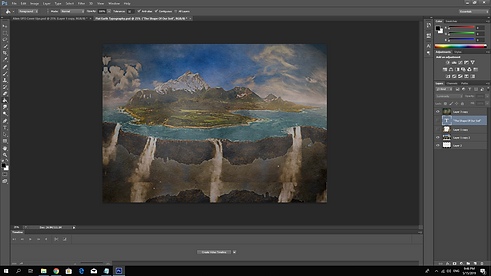
For the last designs I experimented with I changed the look and the aesthetic present in the previous experimentations completely just like I did with previous artworks. For these designs I changed the main designed and edited image and the typography overlay layers however I kept the oil painting overlay the same. I used the filter gallery to switch from the "Dry Brush" filter to the "Plastic Wrap" which created a really cool design. I then merged all of the layers visible creating only one layer.
Third Artwork - UFO cover ups
.png)

This is the final design of the artwork for the third conspiracy theory which is that the government is hiding the existence of UFOs and extraterrestrials. I chose to use this design as my final as in my opinion it is the best looking out of all of the designs I have experimented in terms of the colour scheme and the effect it has. As I wanted all of my art pieces have the same look to show that no matter what conspiracy theory it is, it still is around they same premise. I also chose this design as I like the contrast between the colours in the artwork too. I like how the artwork also clearly displays two soldiers at the front and the crashed UFO but blurs everything else in the background making the audience focus on the soldiers walking towards the UFO as soon as they look at the artwork. This also works well as it makes the artwork more immersive as people can speculate what the soldiers will do with the UFO.

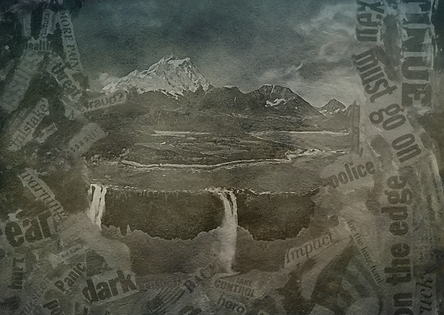
This is the final design of the artwork for the fourth and last conspiracy theory which is that the Earth is flat. I have decided to use this particular design as my final as I believe it displays and explores the idea of the Earth being flat the best. All of my art pieces are made in the same way as I wanted my art pieces to have the aesthetic of an old painting which I achieved in every single artwork. I also made the art pieces in the same way and kept them the same style to show that no matter what conspiracy theory it actually is, it still has the same idea behind it of people making up a vague theory without any real evidence and throwing away every rational explanation for it. I therefore used the typography overlay in the same way as the words like; "Panic" and "Fraud?" show how people don't trust the government and how they feel betrayed by the higher people. I also chose to use this as it clearly shows how the flat Earth believers view our planet.

Experimenting - Typography
I also wanted to experiment with typography a bit more however I did not want to change the typography overlay therefore I decided to add some typography at the bottom of every art piece to better explain and explore the conspiracies behind the art and the catalog
For the first art piece I have created I chose to name it under the subtitle of "The Plan All Along". I used this sentence in particular as conspiracy theorists believe that 9/11 was an inside job mean it was their plan all along.

For the second art piece I have created I chose to name it "Filmed On Earth". I used this sentence in particular as conspiracy theorists believe that Apollo 11 did not land on the moon and the whole of the moon landing was faked and filmed on Earth.

For the third art piece I have created I chose to name it "Secret Cover-ups". I used this saying in particular as conspiracy theorists believe that the government is covering up the existence of extraterrestrials and all evidence or events that display the existence of them. It is also believed that they also keep crashed UFOs and their weaponry or equipment in bases such area 51.

For the Fourth art piece I have created I chose to name it "The Shape Of Our Soil". I used this sentence in particular as right now the most famous and hot conspiracy theory is that the earth is flat. A lot of people believe that the shape of our planet is actually a disk not a globe.

Experimenting - Physical Print
As I was done with designing and finishing my artworks, I was ready to make the art pieces physical. I started thinking about how I will print out my catalog to show off the theme of conspiracy theories. In this catalog I wanted to include the cover, the four artworks presenting four different conspiracy theories and a back cover. I was not sure on how I will make this happen, therefore I started conducting some personal research on how to get my catalog printed. I also asked some of my teachers for their opinion and ideas of how to create a physical copy of the catalog. My teachers recommended a website called doxzoo.com where you can print posters, documents, notebooks and normal books. I decided to use this website to print my catalog however I had to have all of the artworks and the cover of the catalog in the same file, and I did not know how to achieve that at that stage. I therefore did some research and found out that I need to create a PDF file and upload all of the files I need for the printable catalog. I was able to do this on Adobe Photoshop. I clicked "File" and then "Automate". This opened up a lot of options however because I had to create a PDF file I chose "PDF Presentation".


It then opened up the PDF presentation window where I was able to upload all my files needed for printing the catalog.


After configuring some of the settings to suit my catalog's quality I was able to combine all of the files needed into one and save it as a PDF. I named the newly created PDF file "Print". Below you can have a look at the printable file which includes all my designs for the catalog ready to be printed.


I then uploaded the PDF file onto the Doxzoo website. On the website I had to configure some more settings such as the materials for the cover and if I wanted to print it in black and white or in colour. After choosing all of the settings for high quality printing, I could see a preview of what the catalog will look like.

I then paid for the catalog and paid a bit extra to get it delivered faster due to the deadline being so close. I had to wait a couple of days for it to arrive therefore I mainly worked on my research while waiting. You can see the printed catalog below.
Social Media - Instagram Page
Social media is revolutionising communication because it brings a new level of efficiency to influencing social change. Social media campaigns led by individuals, nonprofits, NGOs, government, or businesses can illuminate social issues, environmental concerns, and positive deeds. It’s easy to think that social media is a force for negativity that it’s bad for our mental health to be constantly exposed to a stream of news and avenues for comparing ourselves to others. But social media can also be a platform for creating and sustaining positive social changes, and it’s something that everyone can be a part of. People from anywhere can connect with anyone. Regardless of the location and religion. The beauty of social media is that you can connect with anyone to learn and share your thoughts. Social media also enables two-way conversations and the social media interactions are much more public and fluid. Social media is also good for starting discussions and conversations as It exposes people to different points of view, new ideas, and gives the power to research those opinions and discuss them with others. If someone puts an idea in front of you that you’ve never considered, you can look up the data for yourself, read about both sides of an issue, and have your mind opened to new and shiny points of view. To start a conversations and inform people about these conspiracy theories, I chose to use Instagram. Instagram is one of the most famous and popular social media sites. It is a mobile photo and video sharing application. The best features of Instagram is the high visibility of a post , where every post of images can appear in the news feed or home of the followers, the hashtags strategic also enable the capabilities of Instagram to give an impact to the posts to the new users or followers. The post of images will also remain forever as long as the user did not remove it from the account of Instagram so the new followers or users can have a look at the posts and connect with them at any time. The main reason why I chose to use Instagram to start a discussion between people is that Instagram focuses on visual content. People are visual beings and they process visuals 60,000 times faster than plain text, making visual content a lot more popular than textual information. Online consumers can retain only 10 to 20% of the information they read or hear about, but once that information is paired with visual elements, the information retained suddenly goes up to 65%. At any given time, the human brain can only process a very limited amount of information. In addition, any information that can be processed faster will take priority in grabbing a person’s attention. visuals and images are more suited for content than simple blocks or lines of text. People on social media are more willing to engage with visual content. In fact, 40% of online users will provide a more favourable response to visual content than plain textual content. Visual elements, such as images, videos, info graphics and other are undeniably more interesting and appealing to social media users, as well as online consumers in general.
To start a conversation on social media, I first needed to create an Instagram account/page. I decided to name the page "Obscure Beliefs" as this is the name of my physical and digital catalogs. I also uploaded and used my designed cover for the catalog as the profile picture of the page. The title of the bio is Conspiracy Theories. In the bio I also included a quote explaining and representing conspiracy theories. It says the following:
"We assume that when something happens, it happens for a reason.
Essentially, we see coincidences around big events and make up a story out of them." I believe this quote works well as an introduction to the topic as people make up stories out of the not fully explained events to feel more secure and in control of their lives.
I also included my Wix page link so the users can check out my work if they are interested in further researching the topic, seeing more art pieces and how I designed and created them. This would allow the audience to stay engaged in the topic more which would further create and start conversations and discussions.
I then started uploading my already designed content on the page. I uploaded the cover and the back cover of the catalog first as an introduction to conspiracy theories. I then uploaded all of my art pieces included in the catalog. I uploaded this first as when my audience clicks on one of the posts showing off my artwork below, they will be able to see my craft and form an opinion on the conspiracy theory depicted in the art pieces straight away. As one of my main goals was to start a conversation or a discussion in the comments of the post, the posts' captions always included the name or the subtitle of the art piece shown in the post, a summary of the conspiracy theory and a question for the audience looking at the post; "Real or fake? What do you think ?" As I ask a question in the caption, some of the audience will be keen to answer it which could lead to a discussion in the comments on the particular conspiracy theory. I also encourage them to start a discussion in the comments by telling them to answer my given question and comment down below to explain their opinion.


.jpg)
As I only had 5 posts on my Instagram page, I decided to create more content for my page to further show off and present my art and craft and also appeal to a larger audience as some people might be interested in different theories and beliefs. I created a new folder called "Instagram Artwork" to organise all of the pieces I designed and made. I started designing more art pieces in the same way I designed the previous pieces. However this time I explored different theories. I explored the theories of Black helicopters being used to track down UFOs, Global warming being a hoax, Denver Airport being a secret lair for the New World Order and MkUltra experiments. I then next decided to design some different content as everything I had so far were artworks and I wanted my Instagram page to be more diverse which could also appeal to a bigger audience and produce more discussions.
.png)


As I wanted to create more diverse content for my Instagram page I decided to make some typographic designs. For this I have used an app called Typorama. Typorama saves time and tons of work by automatically creating complex text layouts with different fonts and typefaces. By just a few taps, people can instantly get a text beautifully laid out on a background of their choice. This would take hours if Photoshop or a similar photo editor was used. Also the text designs are not templates and they are generated randomly as different styles are chosen. As Typorama is a mobile app, I created these typographic designs on my phone. For these typography designs, I first chose from one of the generated backgrounds/designs on the app. I then chose a quote on the internet which in my opinion worked well in the design. For the first typographic design I decided to use a creepy background and a quote that represents all conspiracy theories or beliefs and not any in particular. I believe this was a good intro to the typographic designs on my Instagram. For the second typographic design I chose to focus on aliens and UFOs. I chose a generated UFO related background on the app and an interesting quote online which explains that the question isn't if aliens actually exist but it's what humans need to use to find them. I believe this design looks professional and aesthetically pleasing. For the third typographic design made using a generated background I chose to explore the MKUltra experiments. I chose a dark background where the person looks stressed and sorrowful. This could show how the experiments affected the patients. I also chose a quote online which briefly explains what MKUltra is. I used this typographic design to inform the audience about this theory.
.jpg)
.jpg)


I wanted to create more typographic designs however I wanted to further explore the conspiracy theories I chose to look at for the catalog which are the 9/11, moon landing and the flat earth theories. I have further looked into the UFO theories already while using the generated backgrounds in Typorama. I also wanted to use my own designed background underneath the typography therefore I decided to redesign my art pieces I have designed for the catalog and remove any typography that was there. I only kept the main design/background and uploaded it to Typorama to design a typographic design using my designed backgrounds. After uploading the designed backgrounds, I added the text/typography to the designs. Below you can see the finished typographic designs exploring the theories I listed above.




Hashtags create great visibility for a campaign, and help you reach your target audience by using relevant hashtags that you know your audience is already following. When used to promote something, the hashtag not only connects you with your followers, but your followers with each other. When used correctly, Instagram hashtags can help you grow your reach, get more engagement, and attract more followers. I have used a number of hashtags in the captions of my posts that link to the topic of art and conspiracy theories to attract my audience as the hashtags used connect the followers to my work. I have also used hashtags such as "startaconversation", "startadiscussion" and "discussion" to encourage my audience to start a conversation on the topic of conspiracy theories and explain their opinions and views in the comments.
.png)
As I had finished all of the artworks and the created typographic content, I uploaded them to the obscurebeliefs Instagram page. It did not take long for my page to start getting recognised a bit. This was due to the use of hashtags. A number of people started liking all of the posts and commenting. Some people started following the page as they were interested. First I started getting comments that were positive towards my work. People were telling me how good the artworks were and that they enjoyed looking at them.
.png)
.png)
.png)
.png)
As my aim was to start a conversation between the people using my posts, I have succeeded. After calling the artworks nice and magical, people started commenting their opinions and thoughts on different conspiracy theories in different posts. Some people agreed or believed the conspiracy theories and some were disagreeing. Some people were even undecided and just gave their opinion on why the particular conspiracy theory could be real and why it could be a hoax. I have got enough responses to see what the audience think about the conspiracy theories I have shown off however I believe as the time passes I will keep on getting responses in the comments where the audience explain even more of their opinions and share their thoughts. Below you can see some of the people who responded and shared their thoughts in the comments. Below the examples, I will be linking the whole obscurebeliefs Instagram page where you can checkout the art pieces and the typographic designs in the posts and the audience responses in the comments of these posts.
.png)
.png)
.png)
.png)
.png)
.png)